
Doverunner Anti Piracy Service Guide
The Doverunner Anti-Piracy Service provides a systematic framework for identifying, monitoring, and removing unauthorized copies of digital content across online platforms. The service integrates automated crawlers with AI/ML, forensic watermark detection (optional), and takedown mechanisms to mitigate content leakage on websites, UGC platforms, social media, file-sharing networks, and messaging applications.
Objectives
- Piracy Detection: Continuous monitoring of defined content metadata (title, type, duration, etc.) against piracy sources.
- Infringing Link Identification: Automated aggregation of URLs and channels hosting or sharing pirated content.
- Takedown Enforcement: Execution of takedown requests (manual or automated) to remove infringing links.
- Revenue Protection & Brand Assurance: Ensuring premium content remains available only on authorized platforms, thereby protecting revenue streams and maintaining brand integrity.
Benefits
This workflow enables content owners and platforms to:
- Minimize revenue loss
- Comply with copyright obligations
- Enhance trust with end-users
- Maintain a controlled and secure content ecosystem
Service Workflow
Section titled “Service Workflow”flowchart LR
subgraph grp_a["Monitoring and takedown"]
direction TB
A(["📄 Provide Metadata"]):::step --> B(["⚙️ Input into Tools"]):::step
B --> C(["🌐 AI/ML Monitoring<br/>(UGC, Social, Web, P2P, Streaming)"]):::step
C --> D(["📊 Dashboard Access"]):::step
D --> E(["🔍 Detect Illegal Leaks"]):::step
E --> F{"❓ Takedown?"}:::decision
F -->|Auto| G(["🤖 Auto Takedown<br/>(DMCA/Notice)"]):::action
F -->|Manual| H(["👤 Manual Review & Action"]):::action
end
subgraph grp_d["Forensic watermarking / DRM (optional)"]
direction TB
I(["💧 Watermark Detection"]):::optional --> J(["📑 Detection Results"]):::optional
J --> K(["🕵️ Identify Leak Source"]):::optional
K --> L(["⛔ Blacklist<br/>(Block/Revoke)"]):::action
end
E --> I
Plan Management
Section titled “Plan Management”Each site in your Content Security account has one Anti-Piracy plan. You choose and track it in the Doverunner Console, on the Anti-Piracy Settings tab, under 1 Plan Management. The Letter of Authorization (LOA) upload is section 2 Letter of Authorization (LOA) on the same tab.
Free Trial
Section titled “Free Trial”- Activating the Content Security trial from the Console Dashboard also sets up Anti-Piracy and starts the free trial.
- The free trial lasts 30 days from account creation and covers up to 1,000 infringing links.
- During the trial you can register up to 2 assets in each of the following combinations of content type and service. Free trial usage on the Settings tab shows how many you have used:
| Combination | Trial asset limit |
|---|---|
| VOD · Monitoring Only | 2 assets |
| VOD · Takedown Only | 2 assets |
| VOD · Monitoring & Takedown | 2 assets |
| Live · Takedown Only | 2 assets |
- Live · Monitoring Only and Live · Monitoring & Takedown are not included in the trial. Request them as a plan.
- When the trial ends, Anti-Piracy becomes read-only for the site until a plan is approved.
- Once a paid plan is activated for one site in your account, the free trial ends for all other sites in the account. Request a plan for each site you want to keep using.
Plan Options
Section titled “Plan Options”A plan is one Content type and one Service:
| Item | Option | Description |
|---|---|---|
| Content type | Video on Demand | Movies, series and other on-demand titles. |
| Content type | Live | Live streams, with any of the three services. Requires a separate approval process. |
| Service | Monitoring Only | Doverunner finds infringing URLs of your registered assets and reports them to you. |
| Service | Takedown Only | Doverunner sends takedown notices for the infringing URLs you submit. |
| Service | Monitoring & Takedown | Doverunner finds infringing URLs of your registered assets and sends takedown notices for them. |
Requesting a Plan
Section titled “Requesting a Plan”-
Choose the Plan
- Open the Settings tab and, under Plan Management, select a Content type and a Service.
-
Send the Request
- Click Request plan.
- For Live, a Request Live Streaming Access dialog opens first. Click Request to send it.
-
Wait for Approval
- The plan status changes to Pending approval, and the Doverunner Anti-Piracy team emails you the result.
- Live requests are answered within 2–3 business days.
- While the request is pending, the selection is locked. To change it, click Withdraw Request, confirm, and send a new request.
-
Start Using the Plan
- Once approved, the status changes to Active and the Settings tab shows the content type, service, approval date and Asset limit (or Unlimited).
- Next steps links take you to register assets (Go to Asset Details) and to upload your LOA (Add LOA, PDF only, up to 10 MB). Sample LOA templates are available as PDF and DOCX.
Plan Status
Section titled “Plan Status”| Status | What it means |
|---|---|
| Free trial | The 30-day trial is running. The days left and the usage of each combination are shown. |
| Pending approval | A plan request is under review. You can withdraw it. |
| Active | The plan is approved and the service is running. |
| Stopped | The plan is approved but you stopped the service. Anti-Piracy is read-only until you resume it. |
| Expired | The trial has ended and no plan is approved yet. Anti-Piracy is read-only; you can request a plan. |
| Unavailable | Anti-Piracy is not set up for the account yet. If you just activated Content Security, wait a moment and reload the page. |
Stopping and Resuming the Service
Section titled “Stopping and Resuming the Service”With an active plan, the Service status area of the Settings tab shows whether the service is running.
-
Stop the Service
- Click Stop service and confirm.
- With a Monitoring service, monitoring ends on every monitored asset. With a Takedown service, takedown requests pause.
- Your assets and URLs stay visible, but you can’t add or edit assets or submit URLs until you resume.
-
Resume the Service
- Click Resume service and confirm. You can make changes again, and takedown requests restart.
- Monitoring does not restart automatically. Start monitoring again on your assets from the Asset Details tab.
Standard Anti-Piracy Monitoring & Takedown Process
Section titled “Standard Anti-Piracy Monitoring & Takedown Process”-
Provide Metadata
- Share the metadata (title, type, format, season/episode info, release window, start & end date of monitoring, etc.) of the content with the Doverunner Anti-Piracy Team.
-
Input into Anti-Piracy Tools
- The Doverunner Anti-Piracy Team will input this information into Doverunner’s advanced anti-piracy tools.
- The system searches and monitors across:
- User-generated content (UGC) platforms
- Social media networks
- Public websites
- File-sharing networks
- Streaming platforms
-
Dashboard Access
- A dashboard link will be shared with you, enabling real-time monitoring of piracy incidents and progress updates.
-
Monitoring & Takedown
- Once monitoring begins, the system will detect illegal leaks (pirated links, streams, or downloads).
- You can request takedowns automatically (system-driven DMCA/Notice & Takedown) or manually (on-demand review & action).
Additional Workflow with Forensic Watermarking & DRM
Section titled “Additional Workflow with Forensic Watermarking & DRM”-
Forensic Watermark Detection (Optional)
- If the content has Doverunner Forensic Watermarking applied, you may initiate watermark detection requests for suspicious or pirated copies. See the Watermark Detection Service Guide or Watermark Detection API Guide for how to submit a detection request. The
cid/content ID used for this content must be the same value used when it was processed through T&P and/or FWM Session Manager — mismatched content IDs across products silently break this handoff (see T&P/FWM cross-system ID note).
- If the content has Doverunner Forensic Watermarking applied, you may initiate watermark detection requests for suspicious or pirated copies. See the Watermark Detection Service Guide or Watermark Detection API Guide for how to submit a detection request. The
-
Detection Results
- Once detection completes, results (detected watermark payload, timestamp, or detection failure) are made available in the Doverunner Console.
- This helps identify the exact source of the leak (e.g., account ID, distributor, or session).
-
DRM Blacklist Action
- Using Doverunner DRM Blacklist features, accounts identified as leak sources can be blocked or revoked to prevent further unauthorized distribution. See the DRM Blacklist Guide for setup and usage.
Required Information
Section titled “Required Information”You need to provide the following information to use Doverunner Anti-Piracy service.
| Item | Description | Example |
|---|---|---|
| 1. The details of the content | Provide the title and a short description of the content to be protected (include format, runtime, episode info, season, etc.). | Movies — Example: “The Last Horizon” — Feature film, 120 min; Web series — Example: “City Lights” S1 (8 eps x 30 min) |
| 2. Official URL where the content is available | The canonical location(s) where the content is legally hosted (landing page, stream page, content page). Include full HTTPS URL(s). | https://www.example-ott.com/movies/the-last-horizon |
| 3. Copyright owner name | The legal rights-holder (company or individual) that owns or administers copyright. If represented, include the authorized agent / licensor. | XYZ Corporation (Rights Holder) — Represented by Doverunner Media LLP (Authorized Agent) |
| 4. Language & Nature of content | Primary language(s) and content category / genre / nature (e.g., fiction, documentary, live sports, episodic, user-generated). Also note age-rating if relevant. | Language: Hindi, English — Nature: Fiction / Drama, Age rating: U/A 13+ |
| 5. Type of AntiPiracy service | Specify scope of requested anti-piracy actions: Monitoring only, Monitoring + Takedown, Monitoring + Notice & Takedown + Counter-Notice handling, or full enforcement (legal escalation). | Monitoring + Takedown — continuous web & P2P monitoring; issue DMCA/Notice & Takedown; report takedown status weekly |
Monitoring Results and Takedown Requests
Section titled “Monitoring Results and Takedown Requests”In addition to automated monitoring, Doverunner also supports manual takedown requests initiated directly by copyright owners.
-
Customer Portal Access
Copyright owners (or their authorized agents) are provided with a secure Doverunner Takedown Portal.- Through this portal, customers can submit identified infringing links (URLs to pirated content).
- Requests are logged, tracked, and processed in accordance with platform-specific DMCA/Notice & Takedown procedures.
-
Flexibility
This feature is designed for cases where copyright owners or their teams identify additional infringing links outside of automated monitoring. -
Pricing Model
Pricing for manual takedown submissions varies based on:- Platform type (e.g., UGC sites, cyberlockers, social media, streaming portals).
- Number of links submitted for removal.
- Urgency / escalation level (e.g., standard takedown vs. expedited request).
-
Transparency
Customers can track the status of each request (pending, in-progress, completed) via the Doverunner Console.
Anti-Piracy Dashboard Examples
Section titled “Anti-Piracy Dashboard Examples”Content Piracy Dashboard
Section titled “Content Piracy Dashboard”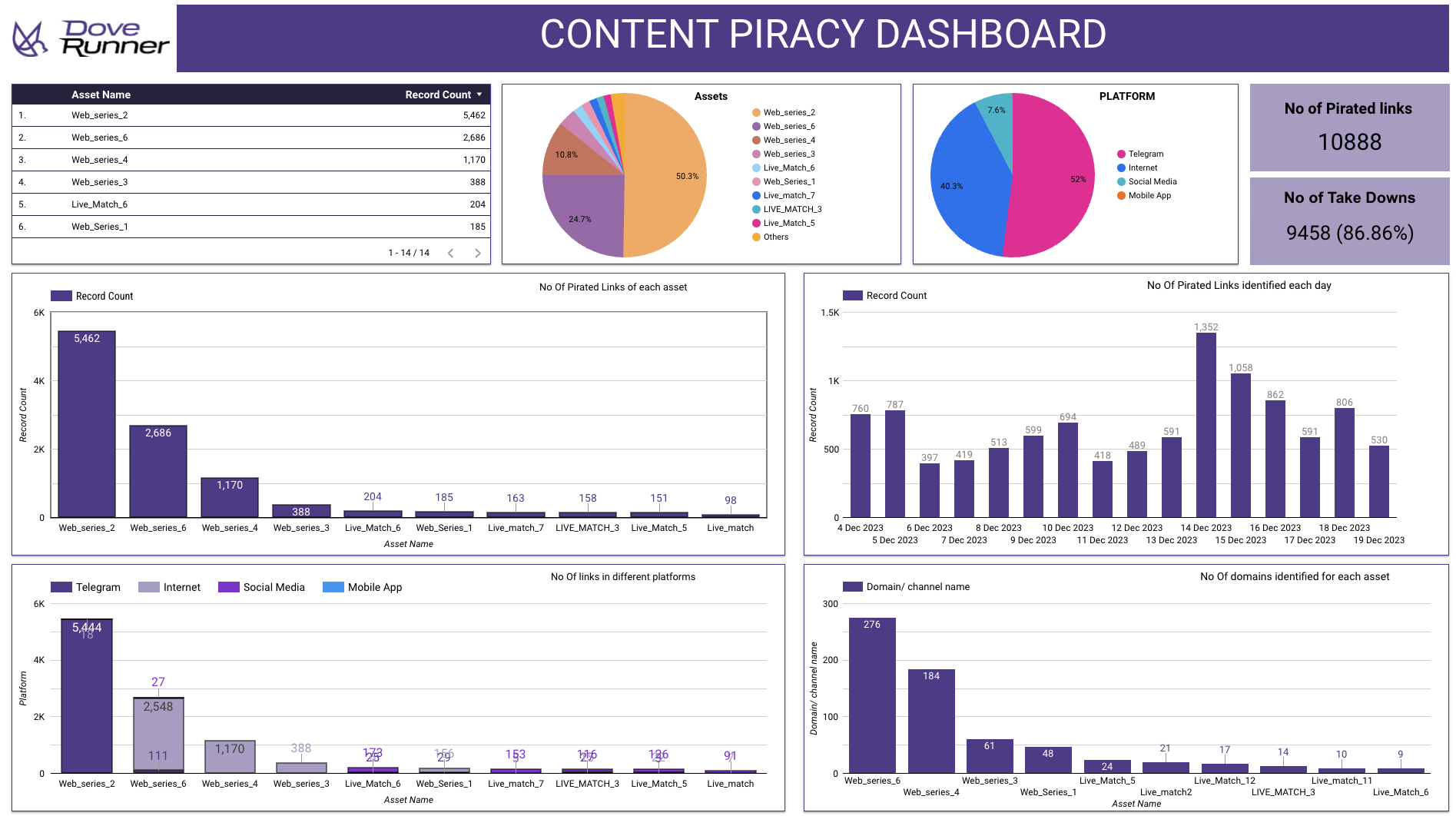
- Shows the total number of pirated links found.
- Shows the total number of links taken down and the percentage of success.
- Breaks down piracy by asset (movies/web series/live matches).
- Shows on which platforms (Telegram, Internet sites, Social Media, Mobile Apps) piracy is happening.
- Tracks how many new pirated links are detected each day.
- Lists how many domains or channels are involved for each asset.
Video Piracy Identification & TAT
Section titled “Video Piracy Identification & TAT”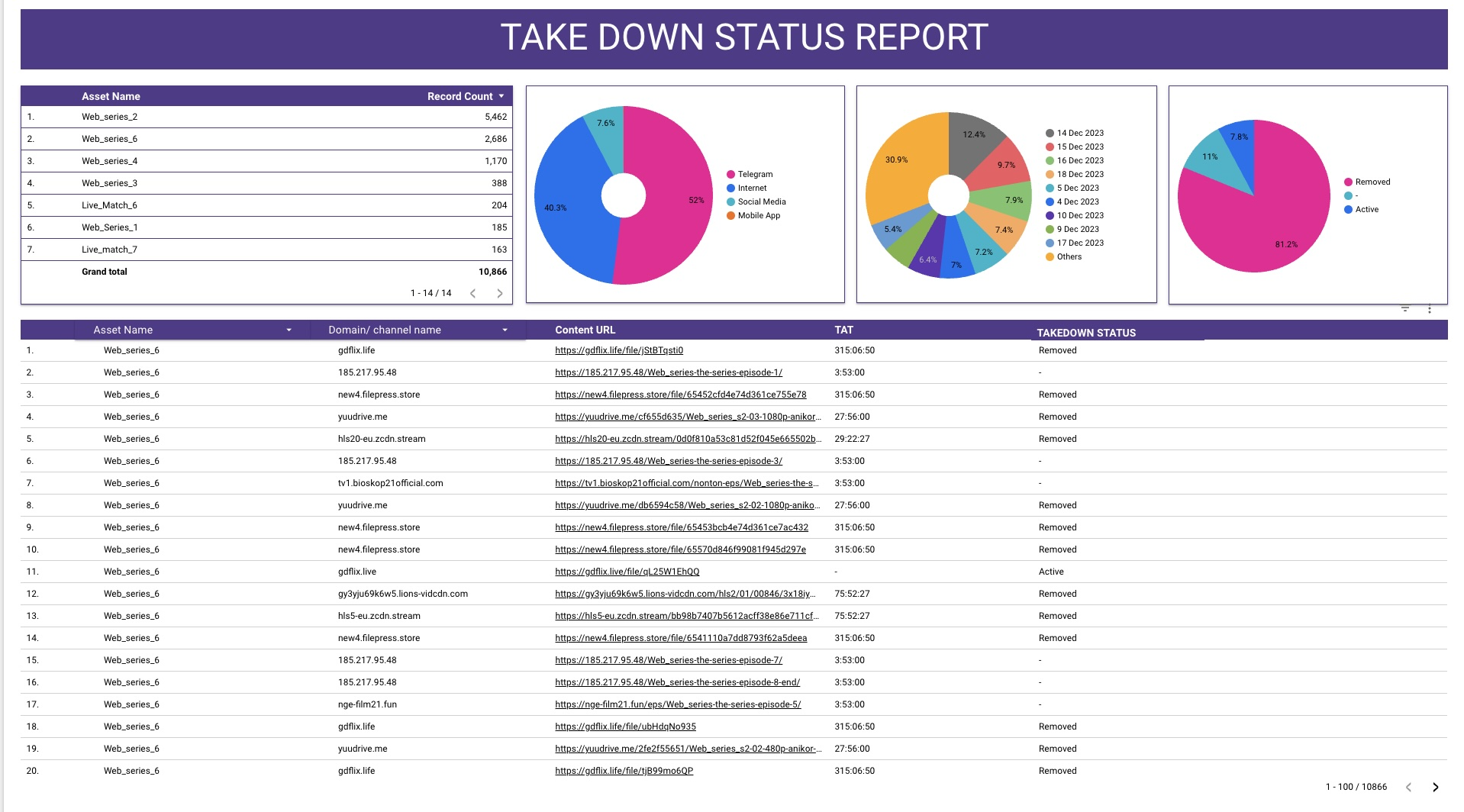
- Shows the trend of piracy over time for each asset (daily identification).
- Helps the user see which content is getting pirated the most on which days.
- Shows the turnaround time (TAT) to remove or delist.
Video Piracy Heat Map
Section titled “Video Piracy Heat Map”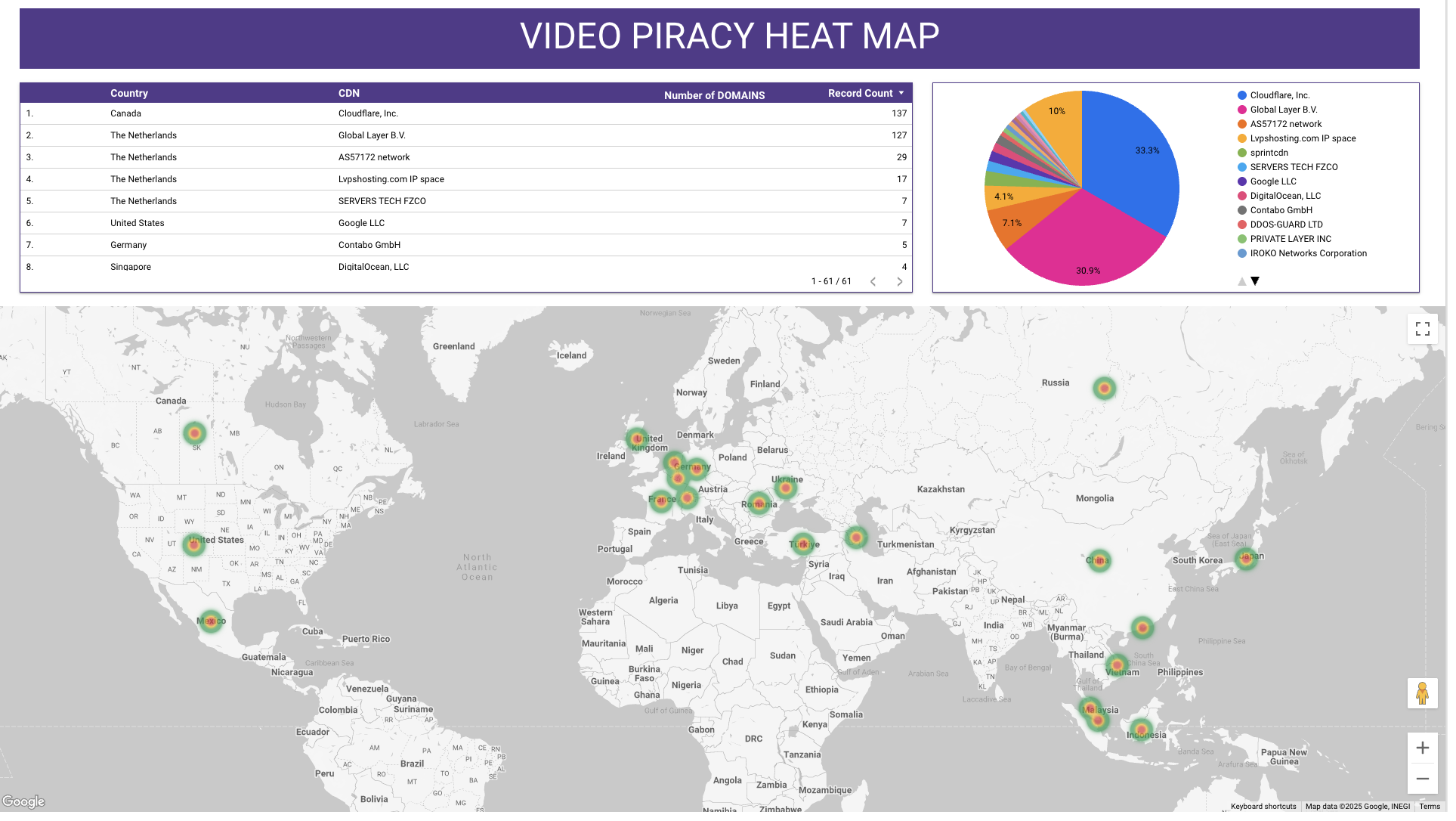
- Shows where in the world pirated content is being hosted (country-level).
- Identifies the hosting providers / CDNs that pirates are using.
- Lets the user quickly see hotspots of piracy activity on a world map.
Daily identification and take down progress
Section titled “Daily identification and take down progress”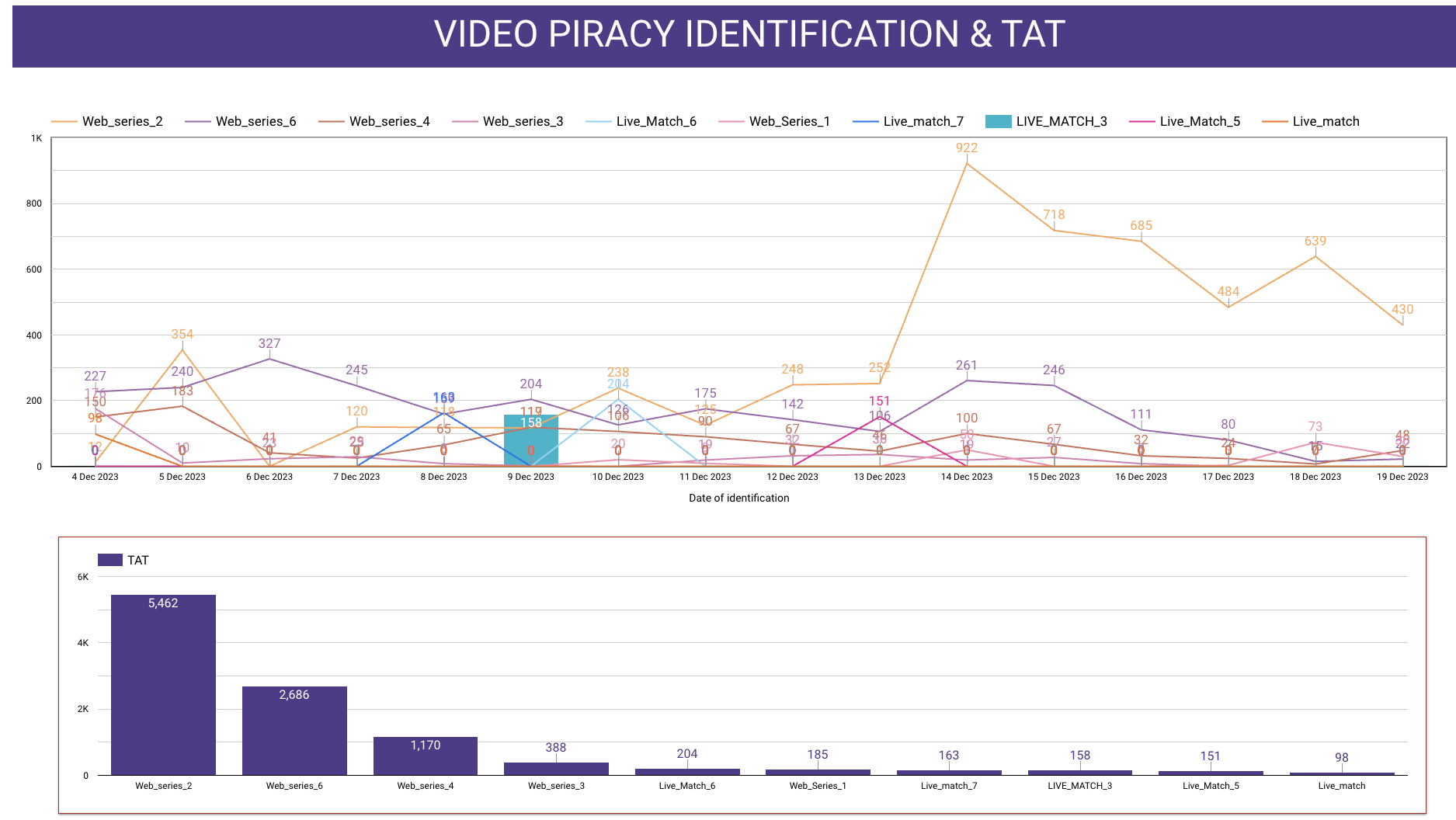
- Shows the status of each takedown request (removed, active, or pending).
- Lists the domain/channel names and URLs where piracy was detected.
- Shows the time taken (TAT) for each takedown.
- Gives a breakdown of takedown performance by date and platform
The dashboard comprises of the following information:
- Summary of total links identified
- Total take down count with %
- Daily monitoring progress
- Daily take down progress
- Count of domains identified for each assets
- Platforms where content is identified