---
title: "Concurrent Stream Limiting Guide"
description: "Concurrent Stream Limiting (CSL) limits the number of streams playing at the same time per user account. This guide explains how CSL works and how to implement it on your platform."
---
> For the complete documentation index, see [llms.txt](https://docs.doverunner.com/llms.txt).
`Concurrent Stream Limiting (CSL)` is a DoveRunner Multi-DRM feature that limits the number of streams playing at the same time **per end user account**. CSL works through periodic DRM `license renewal` during playback, so the license server always knows which streams are still active. The main use of CSL is to prevent excessive account sharing, which reduces the value of your service.
## Common use cases
| Use case | How CSL helps |
| --- | --- |
| **Preventing account sharing** | Apply a default limit to all accounts on your service (e.g., up to 3 simultaneous streams). |
| **Plan-based limits** | Apply a different limit per subscription plan using `max_stream_per_user` in the license token (e.g., Basic plan up to 2, Premium plan up to 5). |
## How CSL works
### License renewal mechanism
A normal DRM license can stay valid for the entire length of the content. With CSL, the license duration is set **shorter** than the content (e.g., 10 minutes), so the client must request a license renewal every `renewal interval` while playback continues. The server uses these renewal requests to determine which streams are still active: if no renewal arrives from a client within the renewal interval, the server assumes playback has ended and removes that stream from the count.
Because the counting happens in the DRM license flow (not in your client application), the logic cannot be bypassed by modifying the client app, and the count self-corrects even when a client terminates abnormally (tab closed, device restarted).
The following example walks through a full session cycle with **maximum concurrent streams = 2** and **renewal interval = 10 minutes**:
1. A user starts playing DRM content on the first device. The license server counts the user's concurrent streams as **1**.
2. Playback starts on a second device with the same user account. The count increases to **2**.
3. The user tries to play on a third device. License issuance fails because the limit is reached. The player shows a message such as *"Cannot start a new playback due to the limit of the maximum number of simultaneous playbacks"* (implemented by the CSL error handling in your service application).
4. Playback on the first device ends. No further renewal requests come from that client, so the count decreases to **1** within 10 minutes.
5. The user retries on the third device. The limit is no longer exceeded, a license is issued, playback begins, and the count increases to **2**.
6. Through this process, the number of concurrent streams for one user account never exceeds 2.
The figure below shows this cycle:
```mermaid
sequenceDiagram
autonumber
box End User
participant D1 as user_id: A - Device 1
participant D2 as user_id: A - Device 2
participant D3 as user_id: A - Device 3
end
box DoveRunner
participant LS as DoveRunner
License Server
end
Note over LS: CSL enabled - max 2 streams,
renewal interval 10 min
D1->>LS: License request (new stream)
LS-->>D1: License issued (count: 1/2)
D1->>D1: Playback starts
loop Every 10 minutes while playing
D1->>LS: License renewal
LS-->>D1: Renewal response (session kept active)
end
D2->>LS: License request (new stream)
LS-->>D2: License issued (count: 2/2)
D2->>D2: Playback starts
loop Every 10 minutes while playing
D2->>LS: License renewal
LS-->>D2: Renewal response
end
D3->>LS: License request (new stream)
LS--xD3: Rejected - error 2102
(limit reached, count 2/2)
Note over D3: Player shows CSL message
(handled by the service app)
Note over D1: Playback ends on Device 1 -
no more renewal requests sent
Note over LS: No renewal received within
the renewal interval -
session released (count: 1/2)
D3->>LS: License request (retry)
LS-->>D3: License issued (count: 2/2)
D3->>D3: Playback starts
```
### Counting model
Keep these four rules in mind - most integration questions come from them:
1. **CSL counts per (user ID, device ID).** The limit is applied per end user account (identified by the `user_id` in the license token), and each concurrent stream is identified by a unique device ID that the DRM key system provides.
2. **The limit is enforced at license issuance.** When a new stream tries to start and the user's active stream count has already reached the configured maximum, the license server rejects the request with CSL error `2102` (*The number of sessions allowed per user has been exceeded*). Your player must detect this and show a friendly message to the user.
3. **Sessions are released by timeout, not by a stop signal.** There is no "stop playback" signal in the protocol. A session is released when its next renewal request does not arrive within the renewal interval, so in the worst case (the user stops immediately after a renewal is sent) the slot is released up to **1x the renewal interval + TTL (10 sec)** after playback ends. This is standard OTT behavior - major streaming services work the same way.
4. **Tabs share a device ID.** Multiple tabs in the same browser instance share one device ID, so they count as **one device**, not one per tab.
The lifecycle of a single CSL session is shown below.
```mermaid
stateDiagram-v2
direction LR
[*] --> Active: License issued
(count increases)
Active --> Active: License renewal
every renewal interval
(keeps session active)
Active --> Expired: No renewal within
the renewal interval
Expired --> Released: Server removes session
(count decreases)
Released --> [*]
note right of Active
Playback can end at any time
(Back button, tab closed,
crash, power loss) - there is no
"stop" signal; release always
happens via the missed renewal
end note
note right of Released
Slot is available again for the
user's other devices - within
1x the renewal interval + TTL
(10 sec) after the last renewal
end note
```
:::note
CSL is applicable only to **streaming** scenarios. VOD download/offline scenarios cannot use CSL because the license cannot be renewed while offline. (Offline playback is not counted as a concurrent stream.)
:::
## Why CSL instead of other methods
Content service providers have historically limited account sharing with the following methods. CSL addresses their main weaknesses.
### Limiting the number of registered devices
This method limits the number of devices that can be registered per user account, using unique device ID information. It is widely used in OTT services, but has problems:
- **Obtaining unique IDs is difficult.** In web browsers such as Chrome it is hard to obtain a unique ID, and privacy restrictions are making it increasingly difficult in mobile apps as well.
- **Device registration/de-registration must be implemented.** When the registered device limit is exceeded, you need a de-registration feature for customer support, and that implementation can itself be hacked.
CSL does not require device registration, and users are not blocked when they change devices - they are only limited in how many streams run at the same time.
### Counting streams at the application level
CSL can also be implemented in your own backend by tracking playback start and end times from your service application. Many services do this, but it has problems:
- **Bypassable by client hacking.** The count logic lives in the client or your API layer, so a modified client can avoid reporting playback.
- **Mismatched counts.** When a client terminates abnormally (crash, power loss), the "play end" signal is lost, the server count never decreases, and the count drifts away from reality.
CSL's DRM license renewal logic cannot be bypassed by client modification, and the server count is automatically corrected within the renewal interval even after abnormal termination.
## Implementing CSL on your platform
CSL has four parts: a **Console setting** (enable + limits), a **license token** (per-request settings), a **player integration** (renewal behavior per DRM environment), and **error handling** in your player. Work through the steps in order.
### Step 1: Enable and configure CSL in DoveRunner Console
Set the `Concurrent Stream Limiting` option to `Enable` on the `Multi-DRM` > `DRM Settings` screen of the DoveRunner Console.
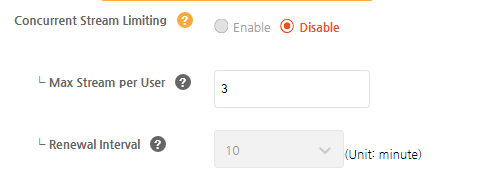 The two settings are described below.
| Setting | Description | Default |
| --- | --- | --- |
| `Max Stream per User` | Maximum number of concurrently playable streams per end user account. | 3 |
| `Renewal Interval` | How often streaming licenses are renewed. A shorter interval determines the end of playback more accurately, but generates more license issuances. Currently offered values: 1 - 15 minutes. | 10 minutes |
The plan requirements differ between trial and commercial accounts:
- **Trial accounts:** CSL can be enabled for free during the trial period.
:::caution
CSL license renewals consume your trial license quota. When the trial usage limit (up to 1,000 licenses per month) is reached, license issuance stops. If you still need to test, contact our Helpdesk.
:::
- **Commercial accounts - MAU (Monthly User-Based) plan:** Select the `Enable Concurrent Stream Limit` option on the `Change Plan` screen. This is billed as an additional CSL fee (base $200/month) on top of the MAU base rate.
- **Commercial accounts - MAL (Monthly License Count-Based) plan:** CSL is available without a separate plan option or additional base fee. The increased license count from renewals is reflected in the invoice.
:::note
When you switch from a trial account to a commercial account, CSL is automatically disabled if the converted plan is MAL-based or if you did not select the CSL option for an MAU-based plan - even if CSL was previously enabled. You can re-enable it on the `DRM Settings` screen (MAL plan) or by changing the plan option (MAU plan; contact our business team or Helpdesk).
:::
### Step 2: Configure the license token
When generating a license token for CSL-enabled content, the following apply (see the [License Token Specification](https://docs.doverunner.com/content-security/multi-drm/license/license-token/) for the full token definition):
| Token field | Required setting | Notes |
| --- | --- | --- |
| `user_id` | A unique end user ID | CSL counts per end user account, so the DRM server needs a unique user ID to identify the account. |
| `playback_policy.persistent` | `false` | CSL applies only to streaming. `persistent: true` (offline) tokens are not counted. |
| `playback_policy.max_stream_per_user` | Optional | Per-issuance override of the Console `Max Stream per User` value. Use it for plan-based limits (see Step 1 use cases). |
| `playback_policy.license_duration` | Ignored with CSL | For `persistent: false` tokens with CSL enabled, license validity fields such as `license_duration` are ignored; the Console `Renewal Interval` applies instead. |
:::caution
CSL requires license policy **V2 or later**. If you are using the V1 license token specification, update to V2 before enabling CSL.
:::
### Step 3: Integrate license renewal in your player
License renewal behaves differently for each DRM. Integrate according to the client environment:
**Widevine (Chrome browser, Android apps, Chromecast)**
Any player can be used. Widevine handles license renewal natively through its license renewal specification, so no player-side API is required - **except** for desktop Chrome, which needs one extra setting to generate a unique device ID:
```js
// Chrome desktop: request persistent state so the key system
// generates a stable, unique device ID.
// (Bitmovin example; configure the equivalent in your player.)
widevine: {
'mediaKeySystemConfig': {
'persistentState': 'required'
}
}
```
:::caution
Without `persistentState: required`, Chrome on desktop may return a **default (non-unique) device ID** across sessions. Because CSL identifies streams by device ID, a non-unique ID can cause the limit to behave incorrectly (e.g., different sessions appearing to be the same device). This was the root cause of a customer integration issue where the configured limit was not enforced as expected.
:::
**PlayReady (Windows Edge browser)**
The player must call a license renewal API manually on the Console renewal interval. Among the HTML5 players DoveRunner has tested, only Bitmovin provides this API ([Bitmovin Player API - renewLicense](https://cdn.bitmovin.com/player/web/8/docs/interfaces/core.drmapi.html#renewlicense)).
```js
// PlayReady (Bitmovin): renew the license on the same cycle as the
// Renewal Interval set in the DoveRunner Console.
// Example: 10 minute interval = 600000 ms.
const RENEWAL_INTERVAL_MS = 600000; // must match Console setting
setInterval(() => {
if (player && !player.isEnded()) {
player.get('drm').renewLicense();
}
}, RENEWAL_INTERVAL_MS);
```
:::caution
If the renewal cycle set in the Console and the cycle applied in the player differ, license renewal will not be processed properly and content playback will stop. The two values must be identical.
:::
**FairPlay - Safari browser**
FairPlay license renewal in Safari is currently supported with the basic HLS player built into Safari and with Video.js. The integration is similar to the PlayReady/Bitmovin approach above.
:::note
If you use Video.js for Safari, note the following (confirmed in customer support cases):
- The `keysessioncreated` callback passes the key session **as a property of the event object** (`event.keySession`), not as a callback argument.
- The `keySession` value is provided starting from **videojs-contrib-eme 5.2.0**. Versions 5.1.x and earlier trigger `keysessioncreated` with no payload at all. If your callback receives no key session, upgrade the plugin (the samples use 5.5.1; the latest is 5.5.2).
- From 5.2.0 the key session is passed for **all** key systems, including the legacy `com.apple.fps.1_0`. However, the renewal logic in the DoveRunner samples only works with the modern `com.apple.fps` key system - legacy key sessions do not expose `keyStatuses` / `keystatuseschange`, so we recommend moving to the modern key system.
:::
```js
// FairPlay (Video.js): capture the key session from the event object
// and start renewals on it.
player.tech().on('keysessioncreated', function (event) {
const keySession = event.keySession; // property on the event object
if (keySession) {
startLicenseRenewal(player, keySession);
}
});
```
**FairPlay - iOS apps**
For iOS apps built with the latest DoveRunner FPS iOS SDK or Bitmovin Player iOS SDK, license renewal is implemented inside the SDK library, so CSL integration is minimal. The renewal interval in the DoveRunner FPS iOS SDK is applied according to the `Response Format` of the license token:
- `original`: The server responds with the actual license data format. Enter the renewal interval in code manually - it must equal the Console setting.
- `json`: The server responds with custom license data in JSON format. The renewal interval value in the JSON is applied automatically, with no manual input needed.
**Player samples**
Complete, runnable CSL samples for each player are in the DoveRunner HTML5 player sample repository:
[HTML5 player sample - CSL related code](https://github.com/doverunner/html5-player-drm-samples/tree/main/advanced/csl)
| Player / environment | Sample |
| --- | --- |
| Bitmovin (Widevine + PlayReady renewal) | [bitmovin-renewal-sample.js](https://github.com/doverunner/html5-player-drm-samples/blob/main/advanced/csl/bitmovin/js/bitmovin-renewal-sample.js) |
| Shaka Player (Widevine) | [shaka-renewal-sample.js](https://github.com/doverunner/html5-player-drm-samples/blob/main/advanced/csl/shaka/js/shaka-renewal-sample.js) |
| Video.js (FairPlay Safari) | [videojs-renewal-sample.js](https://github.com/doverunner/html5-player-drm-samples/blob/main/advanced/csl/videojs/js/videojs-renewal-sample.js) |
| FPS Safari (basic HLS / SDK) | [fps-sdk sample](https://github.com/doverunner/html5-player-drm-samples/tree/main/advanced/csl/fps-sdk) |
:::note
Any player can be used in the Widevine environment, but because of the PlayReady renewal limitation described above, Bitmovin is recommended for a single web player solution covering both Chrome and Edge.
:::
### Step 4: Handle the CSL limit error in your player
When the limit is reached, the license request fails. Check the license response for the CSL error codes below (see the [License Error Code](https://docs.doverunner.com/content-security/multi-drm/license/license-errorcode/) page for the full list):
| Error code | Error message | Meaning |
| --- | --- | --- |
| 2102 | The number of sessions allowed per user has been exceeded. | The CSL limit was reached. **This is the one your users see.** |
| 2101 | License session count processing failed. | Server-side count processing failure. Contact DoveRunner support. |
| 2103 | License session update failed. | Server-side session update failure. Contact DoveRunner support. |
| 2104 | License session creation failed. | Server-side session creation failure. Contact DoveRunner support. |
| 2105 | License renewal update failed. | A renewal request could not be processed. |
Handle `2102` in the player with a clear, actionable message and retry support:
```js
// Pseudocode: detect the CSL limit error in the license request
// failure path and show a friendly message.
if (licenseErrorCode === 2102) {
showUserMessage(
'You are watching on the maximum number of devices for your plan. ' +
'Stop watching on another device and try again.'
);
}
```
Because the previous session's slot is released by the renewal timeout (not immediately), consider showing a hint that the user may need to wait a few minutes - or offer a "retry" button rather than a dead-end error.
### Step 5: Test the implementation
Verify the following behaviors before going to production (with `Max Stream per User` = 2 for the tests):
| # | Test | Expected result |
| --- | --- | --- |
| 1 | Play on device 1, then start device 2 with the same account. | Both play. Server count = 2. |
| 2 | Start a third device with the same account. | License fails with `2102`; your CSL message is shown. |
| 3 | Stop playback on device 1 and immediately retry on device 3. | Still `2102`. The slot has not been released yet - this is expected, not a bug. |
| 4 | Wait up to the renewal interval + TTL (10 sec), then retry on device 3. | Playback succeeds. The slot was released by the missed renewal. |
| 5 | Play on one device, press Back, and immediately resume on the same device. | Playback resumes normally without hitting the limit (same session/device, no new count). |
| 6 | Open two tabs of the same browser, both playing (Chrome, with `persistentState: required`). | Both tabs share one device ID and count as one device, not two. Simultaneous streams from the same device can conflict - do not rely on per-tab counting. |
| 7 | Issue a token with `max_stream_per_user` = 5 while the Console is set to 2. | The token value (5) is used for that issuance. |
| 8 | Issue a token with `persistent: true` (offline download). | CSL is not applied; offline playback is not counted. |
| 9 | Set different renewal intervals in the Console and in the player (PlayReady/FairPlay). | Renewal fails and playback stops - confirm your integration uses one single value everywhere. |
## Configuration reference
### What controls what
A common source of confusion is *which* setting controls *what*. The table below summarizes it:
| Setting | Set where | Controls | Can the token override it? |
| --- | --- | --- | --- |
| `Max Stream per User` | Console | The concurrent stream limit for all streams on the site. | **Yes** - `max_stream_per_user` in the license token overrides the Console value for that issuance (use for plan-based limits). |
| `Renewal Interval` | Console | The license renewal cycle **and** the timing of session release (the count is decremented when a renewal does not arrive within this interval). | **No.** Do not set `renewal_duration` in the license token - the value is derived from the Console settings. |
:::caution
Do not set `renewal_duration` in the license token to change CSL session behavior. The Console `Renewal Interval` is authoritative; the token value is derived from the Console settings.
:::
### Renewal interval: choosing a value
- The shorter the interval, the faster a released slot becomes available to other devices - and the more accurately the end of playback is detected.
- The shorter the interval, the more license renewals are issued (relevant for MAL plan billing and trial quota consumption).
- DoveRunner currently offers renewal intervals ranging between **1 and 15 minutes** in the Console (default 10). If you need a different range, contact our support team.
- We recommend **at least 2 minutes**. Very short intervals cause unnecessary session churn and can produce release delays that look like bugs to end users.
## Expected behavior and troubleshooting
### "The limit is not enforced immediately" / "The slot only frees up after N minutes"
This is the most common CSL question. How it works:
- A CSL session is **not** released when the user presses Back, stops playback, or closes the tab. There is no stop signal in the protocol.
- The server releases a session only when **no renewal request arrives within the renewal interval** after the last renewal it received.
- Therefore a released slot becomes available within **1x the renewal interval + TTL (10 sec)** after the client's last renewal - in the worst case (the user stopped right after sending a renewal), that is the full interval + TTL after playback ended.
- There is currently **no API or mechanism to force an immediate release** of a CSL session. This matches the behavior of major OTT services (Netflix, Disney+, etc.).
- Pressing Back and resuming on the **same device** does not consume a slot: it is recognized as the same active session, so playback resumes normally.
### "Why do multiple tabs in one browser behave this way?"
- Tabs in the same browser instance share **one device ID**, so they count as one device - opening a second tab does not increase the CSL count, even with `persistentState: required`.
- Even though the count does not increase, CSL also tracks **active sessions per device**: when a second stream is requested for a device that already has an active session, the server may treat it as a conflicting session and block the new stream or disrupt the existing one.
- If a user expects per-tab counting (each tab = one stream), that is not how CSL works. Design your user experience around per-device counting.
### "The configured limit seems to be ignored on Chrome"
Check whether `persistentState: required` is set for the Widevine media key system configuration. Without it, desktop Chrome may return a default, non-unique device ID, and CSL cannot distinguish sessions correctly. See Step 3 for the setting.
### "I set the renewal duration in the token, but the Console value is still applied"
Expected. Do not set `renewal_duration` in the license token - it is derived from the Console settings, which are authoritative for the CSL session (see the configuration reference above).
### CSL error during playback (license rejected by the CDM)
If a CSL-enabled stream fails with a generic EME/media key error instead of `2102`, the problem is usually not CSL. Check the standard license troubleshooting items:
- The `cid` (content ID) in the license token matches the content ID embedded in the packaged content's PSSH data.
- The packaged content contains a valid Widevine PSSH box (inspect with tools such as mp4dump).
- The license token `response_format` is `original` for standard web players (a `json` response contains metadata a standard web player cannot parse).
- The license request is not blocked or malformed by CORS - check the license request (e.g., `licenseManager.do`) in browser DevTools: 200 with binary data means the license was issued; 200 with a JSON body contains the DoveRunner error code; 4xx/5xx is a server-side issue (contact DoveRunner support).
## Limitations and notes
### CSL and key rotation cannot be used together
Due to a limitation in the current DoveRunner DRM server implementation, key rotation and CSL cannot be enabled on the same service site. If you provide both live and VOD content, choose based on what matters more to you:
- **Prevent account sharing by limiting simultaneous playback** → use CSL. (Key rotation cannot be applied to live streams.)
- **Enhanced security and business model for live streams** → use key rotation. CSL is not applicable.
### Chromecast and Airplay
If your client supports Google Chromecast or Apple Airplay, keep the following in mind.
:::note
The notes below apply to the **casting/streaming** scenarios (streaming sent directly to and played on the cast device), not **mirroring** (screen sharing from the origin device).
- **Casting / streaming:** The stream is sent directly to the Chromecast or Apple TV and played there.
- **Mirroring:** The stream is still played on the origin device (mobile or browser); only the screen and audio are shared with the cast device. Because of this, mirrored video may show a black screen or be interrupted, depending on the environment.
:::
**Chromecast.** Whether the Chromecast itself is counted as a concurrent stream depends on the Chromecast model/generation:
- If both devices are counted, the cast playback will not start when the origin device has already used the account's remaining slots.
- Cast playback is possible as long as the concurrent stream limit has not been exceeded, because Widevine license renewal works on Chromecast.
**Airplay.** Unlike Chromecast, FairPlay license renewal is not supported on Apple TV. To handle this, the DoveRunner license server does not apply license renewal to FairPlay content played on Apple TV **via Airplay streaming**:
- Only the mobile or web player where playback was started is counted; the Airplay playback on Apple TV is **not** added to the count.
- If playback is started **directly on the Apple TV** (not via Airplay), the Apple TV is reflected in the count as a regular device.
The two settings are described below.
| Setting | Description | Default |
| --- | --- | --- |
| `Max Stream per User` | Maximum number of concurrently playable streams per end user account. | 3 |
| `Renewal Interval` | How often streaming licenses are renewed. A shorter interval determines the end of playback more accurately, but generates more license issuances. Currently offered values: 1 - 15 minutes. | 10 minutes |
The plan requirements differ between trial and commercial accounts:
- **Trial accounts:** CSL can be enabled for free during the trial period.
:::caution
CSL license renewals consume your trial license quota. When the trial usage limit (up to 1,000 licenses per month) is reached, license issuance stops. If you still need to test, contact our Helpdesk.
:::
- **Commercial accounts - MAU (Monthly User-Based) plan:** Select the `Enable Concurrent Stream Limit` option on the `Change Plan` screen. This is billed as an additional CSL fee (base $200/month) on top of the MAU base rate.
- **Commercial accounts - MAL (Monthly License Count-Based) plan:** CSL is available without a separate plan option or additional base fee. The increased license count from renewals is reflected in the invoice.
:::note
When you switch from a trial account to a commercial account, CSL is automatically disabled if the converted plan is MAL-based or if you did not select the CSL option for an MAU-based plan - even if CSL was previously enabled. You can re-enable it on the `DRM Settings` screen (MAL plan) or by changing the plan option (MAU plan; contact our business team or Helpdesk).
:::
### Step 2: Configure the license token
When generating a license token for CSL-enabled content, the following apply (see the [License Token Specification](https://docs.doverunner.com/content-security/multi-drm/license/license-token/) for the full token definition):
| Token field | Required setting | Notes |
| --- | --- | --- |
| `user_id` | A unique end user ID | CSL counts per end user account, so the DRM server needs a unique user ID to identify the account. |
| `playback_policy.persistent` | `false` | CSL applies only to streaming. `persistent: true` (offline) tokens are not counted. |
| `playback_policy.max_stream_per_user` | Optional | Per-issuance override of the Console `Max Stream per User` value. Use it for plan-based limits (see Step 1 use cases). |
| `playback_policy.license_duration` | Ignored with CSL | For `persistent: false` tokens with CSL enabled, license validity fields such as `license_duration` are ignored; the Console `Renewal Interval` applies instead. |
:::caution
CSL requires license policy **V2 or later**. If you are using the V1 license token specification, update to V2 before enabling CSL.
:::
### Step 3: Integrate license renewal in your player
License renewal behaves differently for each DRM. Integrate according to the client environment:
**Widevine (Chrome browser, Android apps, Chromecast)**
Any player can be used. Widevine handles license renewal natively through its license renewal specification, so no player-side API is required - **except** for desktop Chrome, which needs one extra setting to generate a unique device ID:
```js
// Chrome desktop: request persistent state so the key system
// generates a stable, unique device ID.
// (Bitmovin example; configure the equivalent in your player.)
widevine: {
'mediaKeySystemConfig': {
'persistentState': 'required'
}
}
```
:::caution
Without `persistentState: required`, Chrome on desktop may return a **default (non-unique) device ID** across sessions. Because CSL identifies streams by device ID, a non-unique ID can cause the limit to behave incorrectly (e.g., different sessions appearing to be the same device). This was the root cause of a customer integration issue where the configured limit was not enforced as expected.
:::
**PlayReady (Windows Edge browser)**
The player must call a license renewal API manually on the Console renewal interval. Among the HTML5 players DoveRunner has tested, only Bitmovin provides this API ([Bitmovin Player API - renewLicense](https://cdn.bitmovin.com/player/web/8/docs/interfaces/core.drmapi.html#renewlicense)).
```js
// PlayReady (Bitmovin): renew the license on the same cycle as the
// Renewal Interval set in the DoveRunner Console.
// Example: 10 minute interval = 600000 ms.
const RENEWAL_INTERVAL_MS = 600000; // must match Console setting
setInterval(() => {
if (player && !player.isEnded()) {
player.get('drm').renewLicense();
}
}, RENEWAL_INTERVAL_MS);
```
:::caution
If the renewal cycle set in the Console and the cycle applied in the player differ, license renewal will not be processed properly and content playback will stop. The two values must be identical.
:::
**FairPlay - Safari browser**
FairPlay license renewal in Safari is currently supported with the basic HLS player built into Safari and with Video.js. The integration is similar to the PlayReady/Bitmovin approach above.
:::note
If you use Video.js for Safari, note the following (confirmed in customer support cases):
- The `keysessioncreated` callback passes the key session **as a property of the event object** (`event.keySession`), not as a callback argument.
- The `keySession` value is provided starting from **videojs-contrib-eme 5.2.0**. Versions 5.1.x and earlier trigger `keysessioncreated` with no payload at all. If your callback receives no key session, upgrade the plugin (the samples use 5.5.1; the latest is 5.5.2).
- From 5.2.0 the key session is passed for **all** key systems, including the legacy `com.apple.fps.1_0`. However, the renewal logic in the DoveRunner samples only works with the modern `com.apple.fps` key system - legacy key sessions do not expose `keyStatuses` / `keystatuseschange`, so we recommend moving to the modern key system.
:::
```js
// FairPlay (Video.js): capture the key session from the event object
// and start renewals on it.
player.tech().on('keysessioncreated', function (event) {
const keySession = event.keySession; // property on the event object
if (keySession) {
startLicenseRenewal(player, keySession);
}
});
```
**FairPlay - iOS apps**
For iOS apps built with the latest DoveRunner FPS iOS SDK or Bitmovin Player iOS SDK, license renewal is implemented inside the SDK library, so CSL integration is minimal. The renewal interval in the DoveRunner FPS iOS SDK is applied according to the `Response Format` of the license token:
- `original`: The server responds with the actual license data format. Enter the renewal interval in code manually - it must equal the Console setting.
- `json`: The server responds with custom license data in JSON format. The renewal interval value in the JSON is applied automatically, with no manual input needed.
**Player samples**
Complete, runnable CSL samples for each player are in the DoveRunner HTML5 player sample repository:
[HTML5 player sample - CSL related code](https://github.com/doverunner/html5-player-drm-samples/tree/main/advanced/csl)
| Player / environment | Sample |
| --- | --- |
| Bitmovin (Widevine + PlayReady renewal) | [bitmovin-renewal-sample.js](https://github.com/doverunner/html5-player-drm-samples/blob/main/advanced/csl/bitmovin/js/bitmovin-renewal-sample.js) |
| Shaka Player (Widevine) | [shaka-renewal-sample.js](https://github.com/doverunner/html5-player-drm-samples/blob/main/advanced/csl/shaka/js/shaka-renewal-sample.js) |
| Video.js (FairPlay Safari) | [videojs-renewal-sample.js](https://github.com/doverunner/html5-player-drm-samples/blob/main/advanced/csl/videojs/js/videojs-renewal-sample.js) |
| FPS Safari (basic HLS / SDK) | [fps-sdk sample](https://github.com/doverunner/html5-player-drm-samples/tree/main/advanced/csl/fps-sdk) |
:::note
Any player can be used in the Widevine environment, but because of the PlayReady renewal limitation described above, Bitmovin is recommended for a single web player solution covering both Chrome and Edge.
:::
### Step 4: Handle the CSL limit error in your player
When the limit is reached, the license request fails. Check the license response for the CSL error codes below (see the [License Error Code](https://docs.doverunner.com/content-security/multi-drm/license/license-errorcode/) page for the full list):
| Error code | Error message | Meaning |
| --- | --- | --- |
| 2102 | The number of sessions allowed per user has been exceeded. | The CSL limit was reached. **This is the one your users see.** |
| 2101 | License session count processing failed. | Server-side count processing failure. Contact DoveRunner support. |
| 2103 | License session update failed. | Server-side session update failure. Contact DoveRunner support. |
| 2104 | License session creation failed. | Server-side session creation failure. Contact DoveRunner support. |
| 2105 | License renewal update failed. | A renewal request could not be processed. |
Handle `2102` in the player with a clear, actionable message and retry support:
```js
// Pseudocode: detect the CSL limit error in the license request
// failure path and show a friendly message.
if (licenseErrorCode === 2102) {
showUserMessage(
'You are watching on the maximum number of devices for your plan. ' +
'Stop watching on another device and try again.'
);
}
```
Because the previous session's slot is released by the renewal timeout (not immediately), consider showing a hint that the user may need to wait a few minutes - or offer a "retry" button rather than a dead-end error.
### Step 5: Test the implementation
Verify the following behaviors before going to production (with `Max Stream per User` = 2 for the tests):
| # | Test | Expected result |
| --- | --- | --- |
| 1 | Play on device 1, then start device 2 with the same account. | Both play. Server count = 2. |
| 2 | Start a third device with the same account. | License fails with `2102`; your CSL message is shown. |
| 3 | Stop playback on device 1 and immediately retry on device 3. | Still `2102`. The slot has not been released yet - this is expected, not a bug. |
| 4 | Wait up to the renewal interval + TTL (10 sec), then retry on device 3. | Playback succeeds. The slot was released by the missed renewal. |
| 5 | Play on one device, press Back, and immediately resume on the same device. | Playback resumes normally without hitting the limit (same session/device, no new count). |
| 6 | Open two tabs of the same browser, both playing (Chrome, with `persistentState: required`). | Both tabs share one device ID and count as one device, not two. Simultaneous streams from the same device can conflict - do not rely on per-tab counting. |
| 7 | Issue a token with `max_stream_per_user` = 5 while the Console is set to 2. | The token value (5) is used for that issuance. |
| 8 | Issue a token with `persistent: true` (offline download). | CSL is not applied; offline playback is not counted. |
| 9 | Set different renewal intervals in the Console and in the player (PlayReady/FairPlay). | Renewal fails and playback stops - confirm your integration uses one single value everywhere. |
## Configuration reference
### What controls what
A common source of confusion is *which* setting controls *what*. The table below summarizes it:
| Setting | Set where | Controls | Can the token override it? |
| --- | --- | --- | --- |
| `Max Stream per User` | Console | The concurrent stream limit for all streams on the site. | **Yes** - `max_stream_per_user` in the license token overrides the Console value for that issuance (use for plan-based limits). |
| `Renewal Interval` | Console | The license renewal cycle **and** the timing of session release (the count is decremented when a renewal does not arrive within this interval). | **No.** Do not set `renewal_duration` in the license token - the value is derived from the Console settings. |
:::caution
Do not set `renewal_duration` in the license token to change CSL session behavior. The Console `Renewal Interval` is authoritative; the token value is derived from the Console settings.
:::
### Renewal interval: choosing a value
- The shorter the interval, the faster a released slot becomes available to other devices - and the more accurately the end of playback is detected.
- The shorter the interval, the more license renewals are issued (relevant for MAL plan billing and trial quota consumption).
- DoveRunner currently offers renewal intervals ranging between **1 and 15 minutes** in the Console (default 10). If you need a different range, contact our support team.
- We recommend **at least 2 minutes**. Very short intervals cause unnecessary session churn and can produce release delays that look like bugs to end users.
## Expected behavior and troubleshooting
### "The limit is not enforced immediately" / "The slot only frees up after N minutes"
This is the most common CSL question. How it works:
- A CSL session is **not** released when the user presses Back, stops playback, or closes the tab. There is no stop signal in the protocol.
- The server releases a session only when **no renewal request arrives within the renewal interval** after the last renewal it received.
- Therefore a released slot becomes available within **1x the renewal interval + TTL (10 sec)** after the client's last renewal - in the worst case (the user stopped right after sending a renewal), that is the full interval + TTL after playback ended.
- There is currently **no API or mechanism to force an immediate release** of a CSL session. This matches the behavior of major OTT services (Netflix, Disney+, etc.).
- Pressing Back and resuming on the **same device** does not consume a slot: it is recognized as the same active session, so playback resumes normally.
### "Why do multiple tabs in one browser behave this way?"
- Tabs in the same browser instance share **one device ID**, so they count as one device - opening a second tab does not increase the CSL count, even with `persistentState: required`.
- Even though the count does not increase, CSL also tracks **active sessions per device**: when a second stream is requested for a device that already has an active session, the server may treat it as a conflicting session and block the new stream or disrupt the existing one.
- If a user expects per-tab counting (each tab = one stream), that is not how CSL works. Design your user experience around per-device counting.
### "The configured limit seems to be ignored on Chrome"
Check whether `persistentState: required` is set for the Widevine media key system configuration. Without it, desktop Chrome may return a default, non-unique device ID, and CSL cannot distinguish sessions correctly. See Step 3 for the setting.
### "I set the renewal duration in the token, but the Console value is still applied"
Expected. Do not set `renewal_duration` in the license token - it is derived from the Console settings, which are authoritative for the CSL session (see the configuration reference above).
### CSL error during playback (license rejected by the CDM)
If a CSL-enabled stream fails with a generic EME/media key error instead of `2102`, the problem is usually not CSL. Check the standard license troubleshooting items:
- The `cid` (content ID) in the license token matches the content ID embedded in the packaged content's PSSH data.
- The packaged content contains a valid Widevine PSSH box (inspect with tools such as mp4dump).
- The license token `response_format` is `original` for standard web players (a `json` response contains metadata a standard web player cannot parse).
- The license request is not blocked or malformed by CORS - check the license request (e.g., `licenseManager.do`) in browser DevTools: 200 with binary data means the license was issued; 200 with a JSON body contains the DoveRunner error code; 4xx/5xx is a server-side issue (contact DoveRunner support).
## Limitations and notes
### CSL and key rotation cannot be used together
Due to a limitation in the current DoveRunner DRM server implementation, key rotation and CSL cannot be enabled on the same service site. If you provide both live and VOD content, choose based on what matters more to you:
- **Prevent account sharing by limiting simultaneous playback** → use CSL. (Key rotation cannot be applied to live streams.)
- **Enhanced security and business model for live streams** → use key rotation. CSL is not applicable.
### Chromecast and Airplay
If your client supports Google Chromecast or Apple Airplay, keep the following in mind.
:::note
The notes below apply to the **casting/streaming** scenarios (streaming sent directly to and played on the cast device), not **mirroring** (screen sharing from the origin device).
- **Casting / streaming:** The stream is sent directly to the Chromecast or Apple TV and played there.
- **Mirroring:** The stream is still played on the origin device (mobile or browser); only the screen and audio are shared with the cast device. Because of this, mirrored video may show a black screen or be interrupted, depending on the environment.
:::
**Chromecast.** Whether the Chromecast itself is counted as a concurrent stream depends on the Chromecast model/generation:
- If both devices are counted, the cast playback will not start when the origin device has already used the account's remaining slots.
- Cast playback is possible as long as the concurrent stream limit has not been exceeded, because Widevine license renewal works on Chromecast.
**Airplay.** Unlike Chromecast, FairPlay license renewal is not supported on Apple TV. To handle this, the DoveRunner license server does not apply license renewal to FairPlay content played on Apple TV **via Airplay streaming**:
- Only the mobile or web player where playback was started is counted; the Airplay playback on Apple TV is **not** added to the count.
- If playback is started **directly on the Apple TV** (not via Airplay), the Apple TV is reflected in the count as a regular device.