

Android DataSealing
DataSealing Requirements
Section titled “DataSealing Requirements”- Supported from DoveRunner Mobile App Security version 2.23.0.0.
- DataSealing is currently supported only for Android Native C/C++ (NDK). It is not available by default in other frameworks (e.g., Java/Kotlin, Unity, Flutter). If you are using a plug-in that can work with Native C/C++ in these frameworks, you can apply DataSealing by following this guide.
- Support for additional frameworks is planned for a future update.
How to Apply DataSealing
Section titled “How to Apply DataSealing”DataSealing securely encrypts and stores binary file data without additional coding, and allows you to directly read and use the encrypted data.
DataSealing supports native File I/O functions and native AssetManager-related functions. Java File I/O and Java AssetManager support is planned for a future version.
No SDK or library download is required — follow the rules below and apply DataSealing using your existing coding approach.
Asset File Encryption
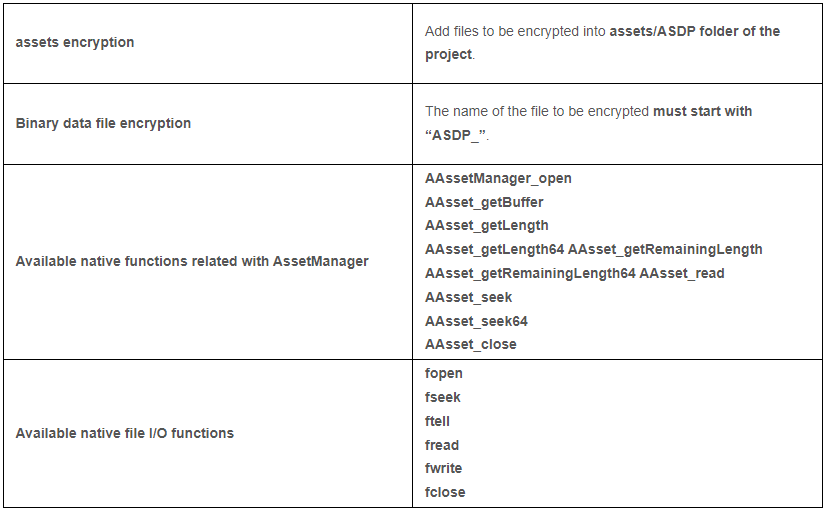
Section titled “Asset File Encryption”To encrypt asset files included in your APK, follow one rule: create a folder named ASDP under the assets folder and move all asset files you want to encrypt into it. Files inside ASDP are automatically encrypted during sealing and automatically decrypted when accessed via AssetManager-related native functions.
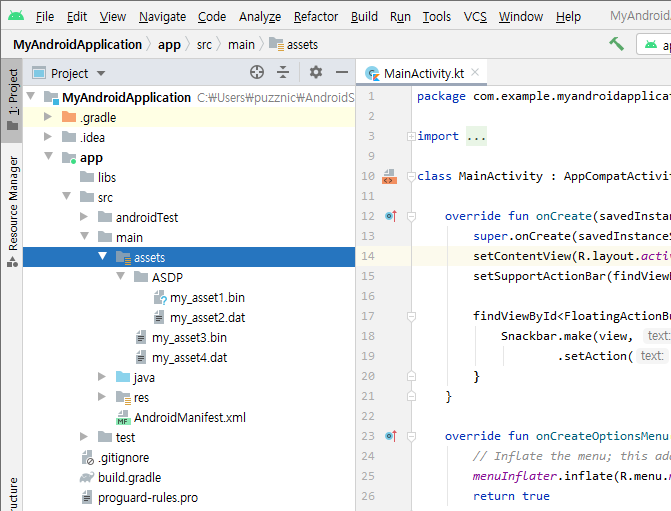
In the example above, my_asset1.bin and my_asset2.dat (placed in the ASDP folder) are encrypted during sealing, while my_asset3.bin and my_asset4.dat (placed directly under assets) are not.
Encrypted asset files are automatically decrypted by DoveRunner Mobile App Security when the following AssetManager native functions are used in JNI code:
AAssetManager_openAAsset_getBufferAAsset_getLengthAAsset_getLength64AAsset_getRemainingLengthAAsset_getRemainingLength64AAsset_readAAsset_seekAAsset_seek64AAsset_closeExample — reading an encrypted my_asset1.bin file (null/error checks omitted):
AAssetManager* am = AAssetManager_fromJava( env, AssetManager );AAsset* asset = AAssetManager_open( am, "ASDP/my_asset1.bin", AASSET_MODE_UNKNOWN );int fileSize = AAsset_getLength( asset );unsigned char* buffer = ( unsigned char* )AAsset_getBuffer( asset );memcpy( data_buffer, ( const void* )buffer, fileSize );AAsset_close( asset );The code is identical to standard asset reading. Decryption happens transparently inside AAsset_getBuffer before memcpy is executed.
General Binary File Encryption
Section titled “General Binary File Encryption”Encryption can also be applied to binary files generated dynamically at runtime. Add the prefix ASDP_ to the filename and encryption/decryption is applied automatically during write/read operations.
Important: This only works for binary files. The "b" character must be included in the fopen mode parameter. Files opened without "b" in the mode will not be automatically encrypted or decrypted.
Supported file I/O functions:
fopenfseekftellfreadfwritefcloseExample — writing an encrypted file (null/error checks omitted):
FILE* fp = fopen( "/files/ASDP_my_secure_data.bin", "wb" );int len = fwrite( secure_data, 1, 4096, fp );fclose( fp );Example — reading back the encrypted file from offset 1024:
FILE* fp = fopen( "/files/ASDP_my_secure_data.bin", "rb" );char buffer[4096] = { 0x00, };fseek( fp, 1024, SEEK_SET );int len = fread( buffer, 1, 2048, fp );fclose( fp );Data read into the buffer is automatically decrypted.
Activating DataSealing in Developer Console
Section titled “Activating DataSealing in Developer Console”When DataSealing is applied with the Native API enabled, a confirmation dialog appears before sealing starts. Accepting the prompt activates DataSealing on the app and sealing restarts automatically.
Pricing
Section titled “Pricing”To check the pricing model for DataSealing, visit the DoveRunner pricing page.